Design the whole call as a visual flow
Most voice AI is one big prompt you tweak and hope. Hanc gives you the whole call on a canvas — drag steps, branch on what the AI hears, call tools, push to your CRM, hand off to a human. The agent follows exactly the path you drew.
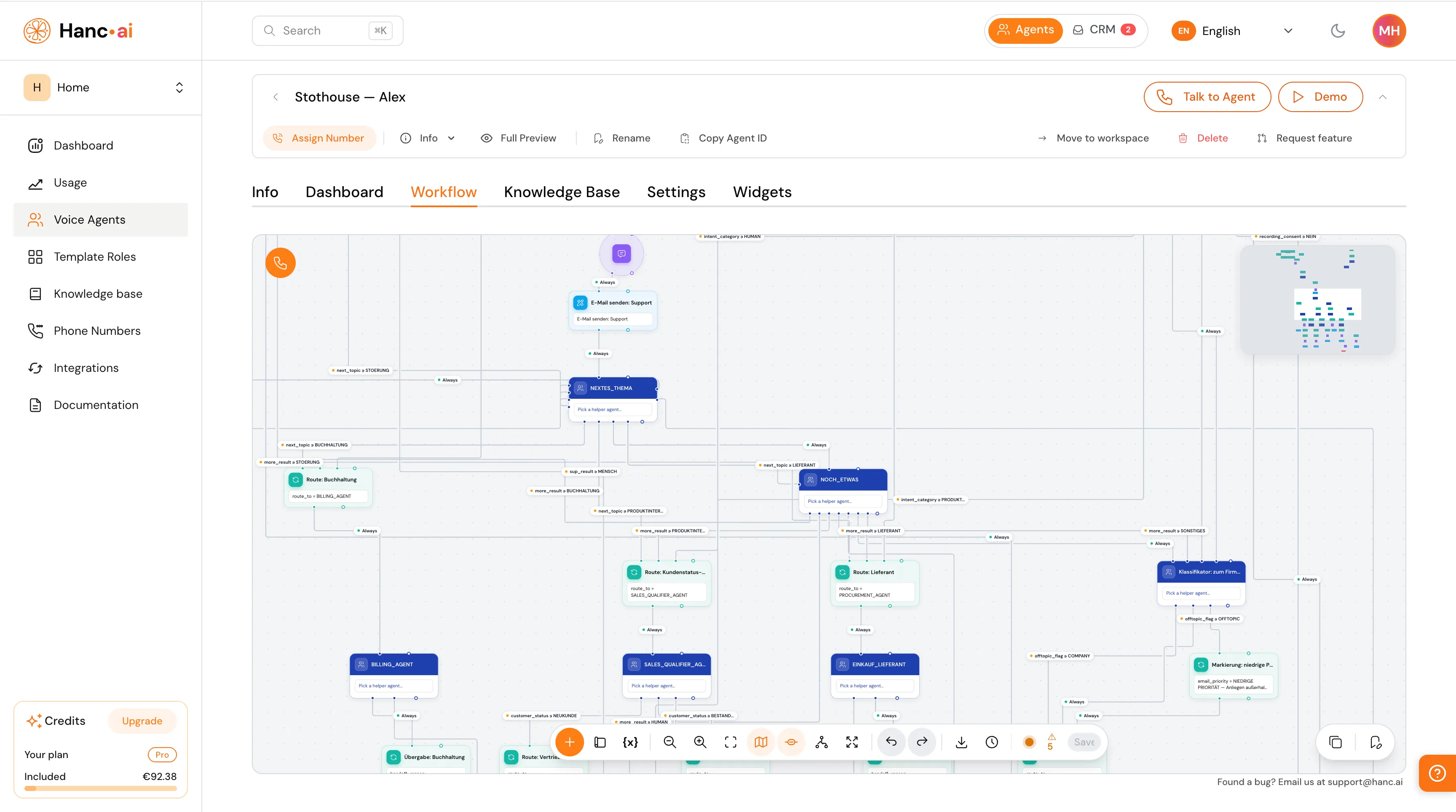
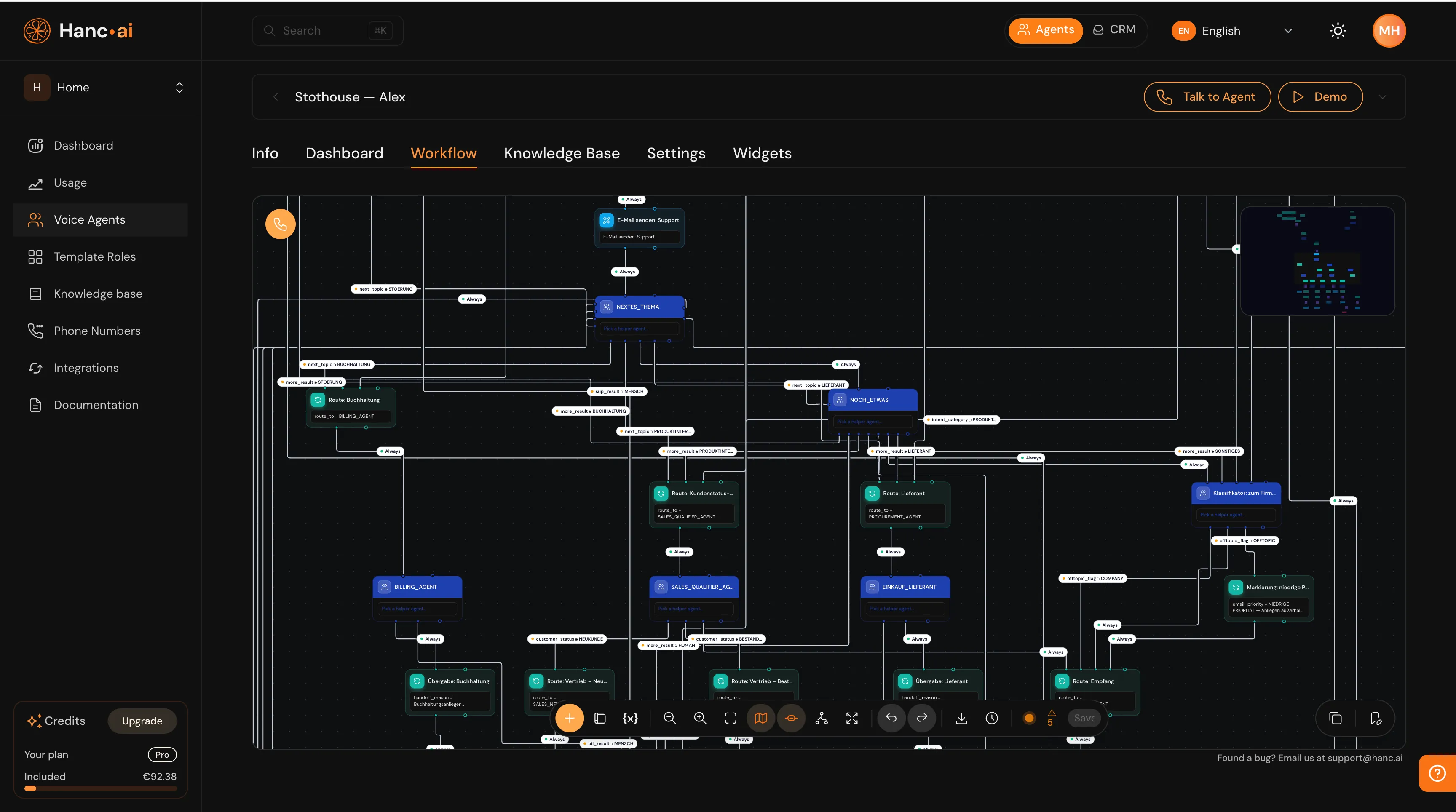
Map your call flow visually — branch on what the caller says, drop in steps, and route every call through the path you design.
A prompt isn't a process
Real calls have structure — greet, understand, qualify, book, escalate, or take a message. You don't need a smarter prompt. You need control over what happens, and when.
It goes off-script
Pack a greeting, qualification, booking and escalation into one prompt and the agent improvises — skipping steps and inventing answers at the edges.
It's a black box
You can't see what the agent will actually do until a customer hits the path you never tested. No map, no confidence.
It's brittle
Tweak one line to fix a branch and you break another. Every change is a gamble across the whole conversation.
Watch a call route itself
Every box is a step you placed. Every line is a decision you drew. This is a reception flow — greet, understand, then branch to the right ending.
Hit Test call and the live conversation lights up the exact path it takes.
Hit + and drop in any step
Press the plus on the canvas and the full palette opens — a Subagent at the top, then every step type below. Pick one, wire it in, and you're building the call.
Subagent — Hand part of the call to a focused helper agent — a classifier, a normaliser, a booking flow — then come back with just the result you need.
Message — Say a line to the caller — plain text, or templated with the variables you captured earlier in the call.
Condition — Branch on a value — equals, not-equals, contains, greater or less than. Strict, predictable rules where you need certainty.
Gather input — Ask the caller a question and capture the answer into a variable — a name, a reason, a number — ready to reuse anywhere downstream.
Update state — Set or change a variable mid-call — track a status, raise a flag, or remember anything the rest of the flow should know.
Tool — Run a tool inline — call an API, search a knowledge base, send an SMS or email, or forward the call to a number.
Integration — Act through a connected integration — book in Google Calendar or Outlook, write to HubSpot, reach an MCP server — as a single step.
End call — Wrap up with a farewell and hang up — or end on the exact branch that fits how the call turned out.
Three ways a call picks its path
Let the agent stay natural where it should, and lock it down where it must. Mix all three in the same flow.
The AI decides
Let the agent read what the caller means and pick the path — natural, flexible routing straight from intent.
A value decides
Branch on a captured value — equals, contains, greater or less than. Strict, repeatable rules where you need certainty.
Always flows
No decision needed — the call simply moves to the next step. The backbone every flow is built on.
Notes & areas to annotate the flow
Drop a note anywhere on the canvas, give it a name, and jot down why a branch exists. Wrap related steps in a labelled area to group a whole part of the call.
It keeps even a thirty-node flow readable — so the next person on your team understands it at a glance, no handover doc needed.
Everything you need, one click away
A floating toolbar sits at the bottom of the canvas — build, navigate, undo, and watch your work save itself.
Add step
Open the palette and drop any step — message, condition, tool, sub-agent — onto the canvas.
Add area
Wrap related steps in a labelled area to keep a big flow readable.
Variables
Inspect every value the call captured, ready to reuse anywhere downstream.
Zoom & fit
Zoom in and out, or fit the whole flow neatly to the screen.
Tidy up
Auto-arrange the nodes into a clean, readable layout in one click.
Full screen
Expand the builder to the full window when you need room to think.
Undo & redo
Step back and forward through your changes — up to 20 of them.
Save status
A live dot shows it all saved (green), still saving, or needing a fix.
Reach the tools you already run on
An Integration or Tool step acts through your connected accounts — book a slot, write a record, send a message, hit an API, or hand the call to a human. One node, done.
Most platforms hand you a prompt and hope for the best.
Hanc hands you the whole call — laid out, branchable and editable. You see every path, every hand-off, every tool call, and you change anything in seconds. That's real control over your agent.
Control you can see — and trust
The call does exactly what you drew — every time, in every language.
Run a test call, watch the route, find the gap, fix it live.
Roles, sub-agents and tools snap together into a real workforce.
Drag, connect, save. From idea to a working agent in minutes — not a project.
One canvas, every scenario
Start from a ready-made role, then shape the exact flow your business runs on.
Reception & booking
Greet, find the reason, check the calendar, book the slot, confirm by SMS — all in one flow.
Lead qualification & routing
Ask the qualifying questions, branch on the answers, send hot leads to sales and log the rest in your CRM.
Voicemail & screening
Screen the caller, take a structured message, and escalate only the urgent ones to a human.
Support triage
Understand the issue, answer from your knowledge base, and hand the hard cases to a person with context.
From canvas to live call in three moves
Drag
Drop steps onto the canvas — message, question, condition, tool, integration, sub-agent, end-call.
Connect
Wire them together and branch. The AI decides, a value decides, or it always flows — you draw the logic.
Go live
Hit save. Your agent runs the exact flow on every call — on the phone and on the web, in 25+ languages.
Questions, answered
Do I need to write code?
No. The whole flow is drag-and-drop on a canvas — anyone on your team can build and edit it.
Can the call still feel natural?
Yes. Let the AI decide which branch to take from what it hears, or pin strict value-based rules where you need certainty. Mix both in the same flow.
What can a single step do?
Speak a line, ask a question, branch, run a tool, call an integration, hand off to a sub-agent or a human, update a variable, or end the call.
Does it work on phone and web?
Both. The same flow runs on incoming and outgoing phone calls and on your website widget, across 25+ languages.
Can I set instructions for the whole flow?
Yes. The start step carries a graph-wide prompt applied to every step, so you set the agent's persona and rules once instead of repeating them on each node.
Can a message go out after the call?
Yes. Send an SMS, email or WhatsApp during the call or once it ends — and attach the call recording to the email when you need the full context.
What variables can I use?
Anything the call captures — names, reasons, tool results — plus built-in values like the current time, call duration and the current step, ready to drop into any message or condition.
How do I keep a big flow readable?
Zoom and fit to frame the whole canvas, flip on a mini-map to jump around, toggle connection labels to read the branching at a glance, auto-tidy the layout in one click, and drop notes or wrap steps in labelled areas.
Your phone, finally
working for you.
Start free in 60 seconds. No credit card. Cancel anytime. Just the phone, picking itself up.