Connect Hanc.AI to Every Tool You Use
Calendar. CRM. Messaging. Your AI voice agent doesn't replace your stack, it plugs right in. Your own tools connect through the REST API and webhooks.

What your AI employee plugs into
Filter by what you already run. Each connection works on phone calls and web calls alike.
-
Google Calendar Live
Book appointments during calls. Check availability, suggest time slots, confirm, and send calendar invites. OAuth 2.0. Multi-calendar support.
-
Outlook Live
Same appointment booking capabilities with Outlook Calendar. Full OAuth 2.0 authentication. Multi-calendar support.
-
Webhooks Live
Send structured JSON data to any system after every call: summary, transcript, entities, and call metadata.
-
REST API Live
Query any external system during a call. CRM lookups, order status, inventory, account data, anything with a REST endpoint.
-
Email Live
Post-call email notifications with customizable templates. Send to team, caller, or both. Includes summary, transcript, and structured data.
-
SMS Live
Send SMS during or after calls: links, confirmations, booking codes, and follow-up messages.
-
WhatsApp Live
Send WhatsApp messages after calls: booking confirmations, documents, and rich messages. Available today for numbers in the United States, Canada and Puerto Rico.
-
HubSpot Live
Sync calls, contacts, and deals to HubSpot CRM. Create or update records, log activity, and trigger workflows in real time.
-
SIP Trunking Live
Bring your own SIP trunk or use ours. Inbound and outbound calls over PSTN with any provider or your carrier.





More connections: mailbox, files, contacts, tasks and CRMs.
The agent also reads and writes email, works with the files you pick in Google Drive, saves callers to your contacts, adds tasks and works in GoHighLevel, Kommo, monday.com and CallRail.
-
Google Meet
- Adds a video link An online meeting gets a Google Meet link in the booking.
-
eTermin
- Books in your booking system Books and moves appointments in eTermin, so they land where your team already looks.
-
Gmail, Outlook Mail, IMAP
- Finds and reads email Searches your mailbox and reads a message together with its attachments.
- Replies in the thread Answers the sender in the same conversation.
- Sends a new email Writes it for you, or fills in one of your templates and keeps your wording exactly.
- Prepares a draft Leaves the reply in your drafts folder, so all you do is press send.
- Marks mail as read Keeps the inbox tidy after it has dealt with a message.
- Calls you about important email Reads every new email and rings you only when one is urgent.
- Gives you the morning mail by phone On weekdays at 08:30 it goes through the unread email and calls you with the five that matter.
- Spots invoices An invoice arrives by email or lands in a Drive folder: it finds the amount, the due date and the IBAN and calls you.
-
Google Drive
- Finds and reads your files Price lists, contracts, instructions: it looks them up while the caller waits.
- Writes notes into a document Creates a new file for a call, or adds to a Google Doc you already keep.
- Keeps the folder tidy Creates folders, renames, moves and copies files.
- Deletes only when told It asks out loud first, and a deleted file goes to the Drive bin, where you can get it back.
- Spots invoices An invoice arrives by email or lands in a Drive folder: it finds the amount, the due date and the IBAN and calls you.
- Watches your files A document or a spreadsheet changed: it reads it and calls if there is something you should know.
-
Google Docs
- Writes notes into a document Creates a new file for a call, or adds to a Google Doc you already keep.
- Watches your files A document or a spreadsheet changed: it reads it and calls if there is something you should know.
-
Google Sheets
- Keeps a spreadsheet up to date Finds a row, adds a new one or changes a cell in Google Sheets.
- Watches your files A document or a spreadsheet changed: it reads it and calls if there is something you should know.
-
Google Contacts
- Knows who is calling Looks the number up in your contacts and greets the caller by name.
- Saves new callers Name, number and company go straight into your Google Contacts.
- Keeps contacts up to date Changes an existing contact when a caller gives a new email or company.
-
Google Tasks
- Adds a task for you “Call the supplier back tomorrow” becomes a Google Task with a due date.
- Ticks tasks off Marks a task as done once it is dealt with.
-
GoHighLevel
- Works in GoHighLevel Your contacts, pipelines and calendars in GoHighLevel, during the call.
-
Kommo
- Works in Kommo Finds and creates leads and contacts, sets tasks and adds notes.
-
monday.com
- Updates your monday.com boards Creates items and changes their status on the boards your team works from.
-
CallRail
- Looks things up in CallRail Your calls, form leads and text messages from CallRail, at hand during the conversation.
-
Talks to your own systems
REST API MCP
- Order status, stock, customer data: it asks your system through an API while the caller is on the line.











During the call, and after it.
Some connections work while the caller is still on the line. Others run the moment the call ends.
During the call
- Google Calendar
- Outlook
- REST API
- SMS
After the call
- Webhooks
- HubSpot
The line itself SIP Trunking
Connect once. Every agent can use it.
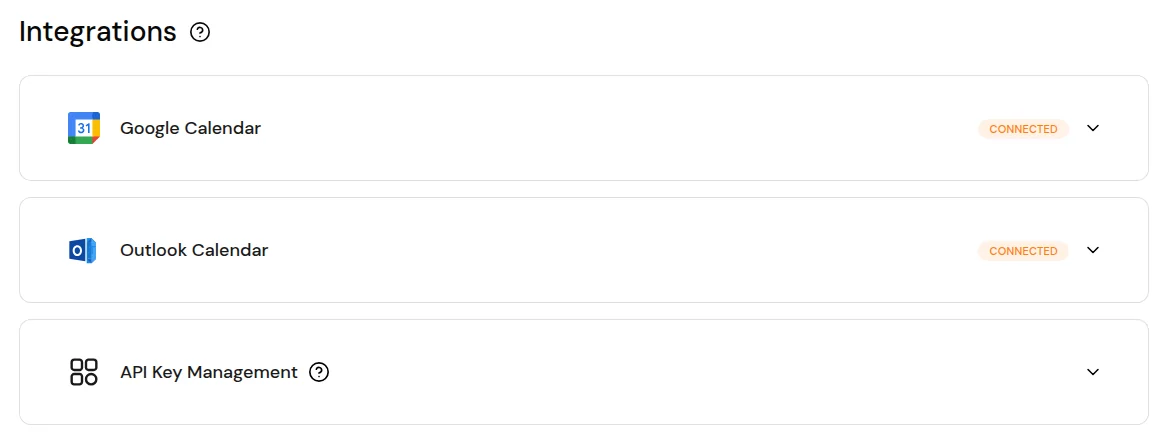
Calendars sign in with OAuth right in the dashboard. Your own systems connect through API keys, webhooks or any REST endpoint.
- Google Calendar and Outlook: sign in, pick the calendar, done.
- API keys for your own systems, managed on the same screen.
Bring your own phone line Use any integration as a workflow step
Questions, answered.
Which calendars does the AI employee work with?
Google Calendar and Outlook Calendar. You sign in on the Integrations screen and pick the calendar. During the call the agent checks when you are free, books the appointment and confirms the time to the caller. An online meeting gets a Google Meet link. It also books appointments in eTermin and takes restaurant reservations through resmio.
Which CRMs can it work in?
HubSpot, GoHighLevel, Kommo and monday.com. The agent works with your records while the caller is on the line, and it can look things up in CallRail. Without any of them, each call still creates or updates a contact in the built-in CRM, with a summary.
How do I connect a system that is not on the list?
Through the REST API and webhooks. During a call the agent asks your system through an API, for example for an order status or customer data. After each call a webhook hands your software the summary, the transcript and the details the agent collected. The API keys are managed on the same Integrations screen.
What does the agent do if I connect nothing?
It still answers every call, answers from the documents you gave it and hands the call to a person when the caller asks for it. Each call is saved in the built-in CRM, with a summary. A connection adds the work around the call: bookings, email, files and your own systems.
Is WhatsApp available in my country?
Today WhatsApp is available for numbers in the United States, Canada and Puerto Rico. There the agent answers on WhatsApp as well as on the phone and sends messages after a call, such as a booking confirmation. Message prices are on the pricing page.
Can I keep my phone number and my phone provider?
Yes. You connect the number your customers know through your own SIP carrier, for inbound and outbound calls. Or you take a new number.
Your phone, finally working for you.