What's new in Release 3.2
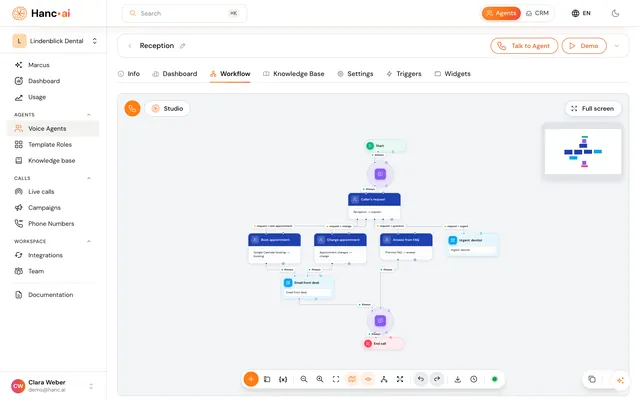
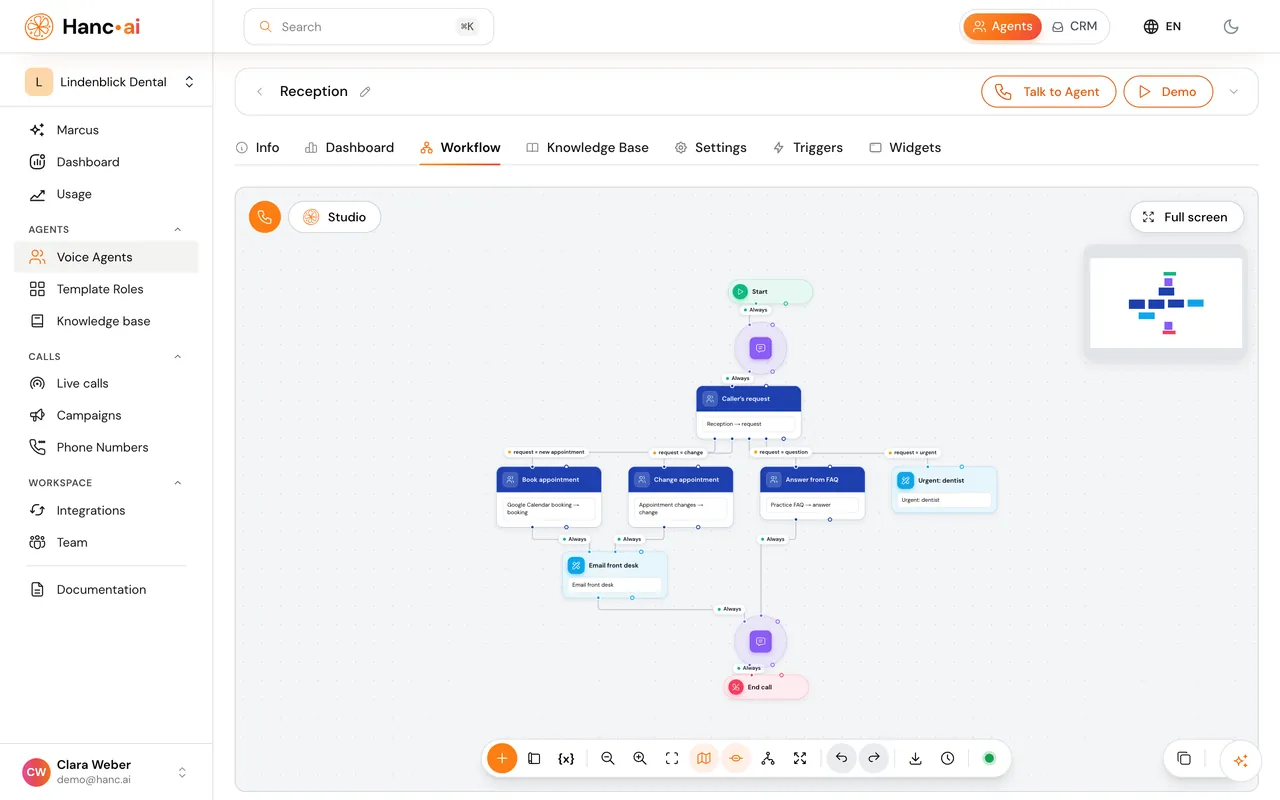
The Workflow Builder, Redesigned: The visual builder has been rebuilt around a new canvas. Steps lay out left to right, connections route cleanly around your cards instead of cutting across them, and a loop back to an earlier step now goes around the flow rather than through it. Drop a connection anywhere on a step to attach it, double-click a connection to edit it, and clear a bend with a single click. Wherever you write a prompt, in a workflow step or an agent's own prompt, {{variables}} are highlighted and suggested as you type, and a variable still resolves if you capitalise it differently from the saved name. Agents built this way carry a Workflow badge in your agent list and open straight into the builder. Workflow is out of beta.
Workflows That Follow the Conversation: A Condition step can now be set to AI decides: describe each way out in plain words, "the caller confirmed the appointment", and your agent takes that path the moment it is true, re-checked after everything the caller says. The Start step gains a global prompt that is added to every step in the flow, so tone and house rules are written once. Steps can also read live call details: the current time, date and weekday in the agent's timezone, which step the call is on, and how long you have been talking, counted from the moment the call is answered, not from the first ring.
The End call step now lets you write the goodbye, one line, or several so the agent varies it from call to call, have it translated into the language of the call, or let the agent compose one on the spot. Hand-offs are calmer too: a sub-agent handing the caller back no longer keeps announcing it, and a sub-agent that opens with a question now asks it instead of finishing immediately.
Follow Up After the Call Ends: Email, SMS and WhatsApp steps can now be set to send after the call rather than during it, so a message built from {{call_transcription}} goes out with the whole conversation instead of only the part that had happened when the step ran. An email sent this way can also attach the call recording as an MP3; the option becomes available once post-call sending is on and recording is enabled in the agent's Settings. And an email step addressed to several recipients at once, separated by commas or semicolons, now reaches every one of them.
Campaigns, Rebuilt: Setting up a campaign takes two steps instead of four, with retries, calling hours and scheduling folded into an Advanced section and a running summary beside you as you build. Importing numbers now tells you straight away how many are valid, invalid or duplicates, invalid rows are left out of the dial list instead of failing later, and gives you an estimated time to dial the list. Each campaign opens on a single clear progress bar with the agent and caller ID it runs on, both of which now show in the campaign list as well. Recordings play again in the campaign call log, and a campaign can be deleted once it is no longer running.
Your Language, Everywhere: All 16 languages got a thorough pass. Dates, times and amounts now follow your language wherever they appear, call logs, campaigns, CRM, calendar and the dashboard, as do form validation messages, campaign and contact status badges, and the security check on sign-up. German is complete, and German, Spanish and Italian now address you formally throughout. Your default deal stages read in your language while any stage you have renamed keeps your own wording, and a new agent starts in your account's language with a matching voice and prompt. If you arrive with nothing saved, the app opens in your browser's language. And your verification, one-time-code and password-reset emails now arrive in your language instead of English.